

Last Updated: November 9, 2026
Quick Summary
The best water bottle for tracking hydration combines a built-in sensor, visible reminders, and an app that logs your progress over time. Models like the HidrateSpark PRO 2, WaterH Boost, and LARQ Bottle PureVis 2 each take a different approach, so match the features to your daily habits. If you prefer not to use an app, a marked bottle and a simple paper log can also work.
- Smart bottles estimate intake using a sensor that detects water level changes after each sip.
- Glow reminders help you notice when you have fallen behind your daily goal.
- The LARQ Bottle PureVis 2 is listed at $139, the WaterH Boost at $70.
- Sensor totals are estimates, so compare a week of app data against a manual tally.
- Reminders are prompts, not medical advice; follow your clinician's guidance if you have a condition affecting fluid balance.
Table of Contents
- What Smart Water Bottles Do and How They Track Intake
- Smart Water Bottle Benefits Beyond Counting Ounces
- Best Water Bottles for Tracking Hydration Compared
- How to Track Water Intake Without an App
- Accuracy, Privacy, and Total Cost of Ownership
- Choosing Your Hydration Tracking Bottle
- Frequently Asked Questions
Staying hydrated during a power outage or a long day on the trail is easy to overlook until it isn't, and the best water bottle for tracking hydration makes that simpler. A smart water bottle that tracks your intake can take the guesswork out of it. The best water bottle for tracking hydration combines a built-in sensor, reminders you can actually see, and an app that logs your progress over time. SHTF Prepper Club has put together this guide to help you sort through the options and pick one that fits your household.
This guide covers how smart bottles measure intake, what they add beyond simply counting ounces, and how three popular models compare. You'll also find a way to track water intake without an app, plus a look at accuracy, privacy, and the total cost of ownership.
What Smart Water Bottles Do and How They Track Intake
A smart water bottle is a reusable container with electronics built into the cap or base. Its job is to record how much you drink and remind you when you fall behind. Most models pair with a phone app, though some store data on the bottle itself.
Built-in sensors and how intake measurement works
Most smart bottles use a sensor in the base or lid to detect the change in water level after each sip. The bottle then converts that change into an estimated volume, usually in ounces or milliliters. Accuracy depends on the sensor design and how consistently you hold the bottle, so expect estimates rather than lab-grade measurements.
Reminders, LED glow alerts, and daily goals
Many bottles light up or glow when it is time to drink. You set a daily goal in the app, and the bottle signals when you have not reached your target on schedule. This visual cue is useful at a desk or during a long shift where you might otherwise forget to sip.
Smart Water Bottle Benefits Beyond Counting Ounces
Logging intake is only the starting point. Smart water bottles can help you build a habit, spot patterns, and stay consistent during busy days. Seeing a running total makes it easier to notice when you have been drinking less than usual, such as during a heat wave or a stressful week.
For families managing older relatives or children, a bottle with reminders can serve as a simple prompt. It does not replace a caregiver's attention, but it can reduce the number of days when fluid intake slips without anyone noticing.
Best Water Bottles for Tracking Hydration Compared
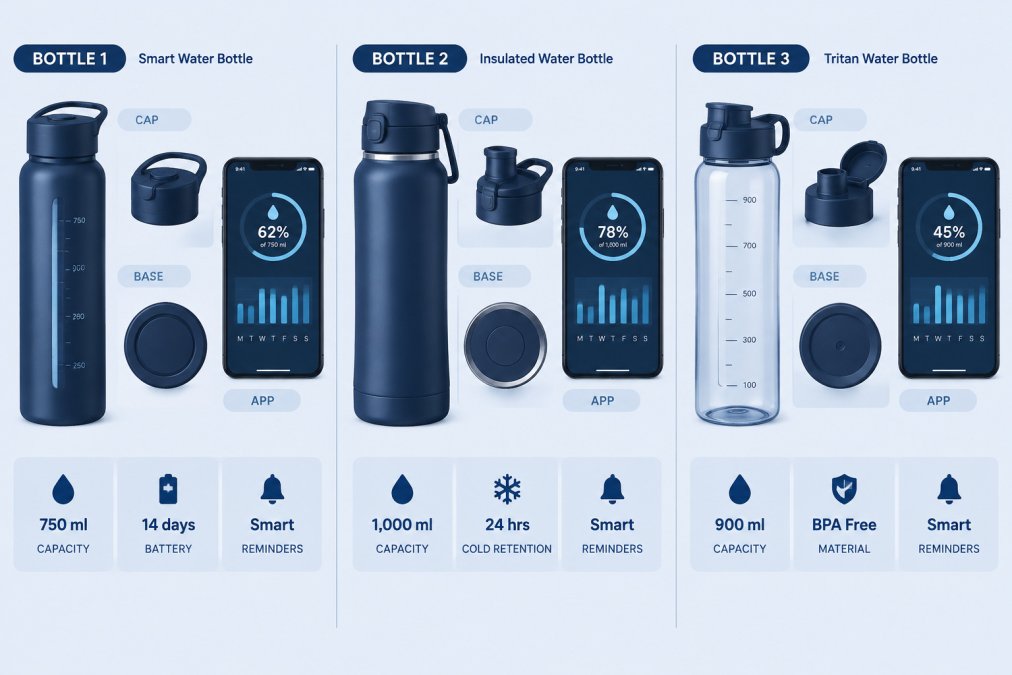
Below are three models widely reviewed for hydration tracking, compared on the features that matter most for daily use: how intake is measured, how reminders work, app depth, battery life, capacity, insulation, and lid style. Check each manufacturer's website for current pricing before you buy.
HidrateSpark PRO 2: pros, cons, and who it suits
The HidrateSpark PRO 2 is a bottle that its manufacturer describes as offering app-connected intake tracking with glow reminders.
Pros:
- Combines intake tracking with visual glow reminders
- Bluetooth syncs bottle data to a companion app with goal-setting and history
- Rechargeable battery avoids disposable batteries
Cons:
- Current price was not shown in the research available to us
- Requires a compatible app and a Bluetooth connection to sync
- Sensor-in-base design means the bottle must be handled consistently for best accuracy
Best for: people who want app-connected tracking, clear drink reminders, and long-term progress history.
WaterH Boost: pros, cons, and pricing
The WaterH Boost is a bottle with a companion app for tracking intake and LED reminders. Capacity and lid style vary by configuration, so confirm the size you need before ordering.
Pros:
- Pairs intake tracking with LED drinking reminders
- Reported 24-hour temperature control
- Insulated build suits commutes, desk work, and outdoor use
Cons:
- Research did not specify its app compatibility or connection details
- Pricing was not confirmed in the research available to us
- Battery life and charging details were not confirmed in the research available
Best for: people who want tracking, reminders, and temperature control in a single bottle.
LARQ Bottle PureVis 2: pros, cons, and pricing
The LARQ Bottle PureVis 2 is a bottle that its manufacturer describes as offering several ways to view water intake, with hydration history and analytics available in its app.
Pros:
- Multiple views of your daily intake
- Hydration history and analytics over time
- Adds water purification alongside tracking
Cons:
- Research did not detail how intake is measured
- Listed price is $139
- Higher upfront cost than the other models compared here
Best for: people who want long-term history, visual feedback, and purification, and who are willing to pay more for it.
Quick comparison
| Model | Starting Price (USD) | Tracking Method | Reminders | Battery/Charging | Best For |
|---|---|---|---|---|---|
| HidrateSpark PRO 2 | Not shown in research | Bluetooth app sync, base sensor | Glow alerts | Rechargeable | App-connected tracking |
| WaterH Boost | $70 | App-based tracking | LED reminders | Not confirmed in research | Tracking plus temperature control |
| LARQ Bottle PureVis 2 | $139 | App with history and analytics | Visual intake views | Not confirmed in research | Long-term hydration history and purification |
How to Track Water Intake Without an App
You do not need a smart bottle to track your intake. A plain bottle and a simple routine can work well.
- Mark your bottle. Use a waterproof marker to add lines at set intervals, such as every 8 ounces or every 250 milliliters, depending on the size of your bottle.
- Set times. Pick four or five points in the day, such as mid-morning and after lunch, and check your level at each one.
- Keep a paper log. A simple tally on a notepad or a whiteboard on the fridge works for most households.
- Refill on purpose. Filling the bottle at the same points each day makes it easier to know how much you have had.
A manual method is free and requires no batteries or charging. Its main drawback is that it relies on you to check and record, so consistency matters.
Accuracy, Privacy, and Total Cost of Ownership
Before you buy, consider three factors that product pages often leave out. This is where most roundups stop at a spec sheet; here is what the numbers and policies actually mean in daily use.
Accuracy and validation. Sensor-based totals are estimates, not measurements. Most bottles infer intake from a change in water level or weight, then convert that change into ounces or milliliters. Treat the numbers as a guide to trends rather than exact measurements, and compare a week of app totals against a manual tally to see how closely they track for you.
Privacy and data handling. Before you pair a bottle with an app, review its privacy policy to see what data is collected. Before you pair the bottle, read the privacy policy and check four things: whether you can use the bottle without an account, what data is collected beyond intake (location, device type, usage times), whether data is shared with third parties, and whether you can export or delete your history. If a household member will use the bottle, confirm whether profiles are separate or merged into one account.
Total cost of ownership. The sticker price is only part of the cost. Consider batteries or charging, replacement parts, any app fees, and how long the bottle is likely to last with daily use. Check the warranty length and whether it covers electronics, not just the bottle body.
Evidence-based hydration guidance. Reminders are prompts, not medical advice. Fluid needs vary by person, activity level, and environment, and a fixed ounce target is a rough starting point rather than a prescription. General guidance from public health organizations notes that fluid needs vary with activity, environment, and health (the NIH). If you have a medical condition that affects fluid balance, follow your clinician's guidance rather than an app's default goal.
Accessibility and usability. App readability matters: check font size, contrast, and whether the app supports screen readers. Alert customization, volume, vibration, repeat frequency, determines whether reminders work in a noisy office or a quiet bedroom. Ease of cleaning matters for any bottle with electronics; confirm whether the sensor module is removable and dishwasher-safe. For children or users with disabilities, look for simple one-button operation and clear visual cues rather than deep app menus.
Choosing Your Hydration Tracking Bottle
Start with your priorities. If you want app syncing and visual reminders, look at the HidrateSpark PRO 2. If temperature control matters as much as tracking, the WaterH Boost is worth comparing. If long-term history is the goal and budget is less of a concern, the LARQ Bottle PureVis 2 is a strong option.
If you are unsure, begin with a simple manual method for a week or two. You will learn how much you actually drink and whether reminders would help. Then choose a bottle that matches the habit you want to build.
Shopping for emergency preparedness gear for your household? Visit SHTF Prepper Club to see our current selection and ask for pricing on food storage, water filtration, and power solutions.
Frequently Asked Questions
Do smart water bottles actually work for tracking hydration?
Most smart water bottles estimate intake by sensing fill level or weight changes, then log it through a companion app. They are useful for building habits and spotting patterns, but readings can drift with temperature, condensation, or how you tilt the bottle. Treat the numbers as a helpful estimate rather than a clinical measurement, and check your own sense of thirst and urine color alongside the app.
How much should I spend on a hydration tracking water bottle?
Prices vary by brand and model. Pricing for the researched options was not confirmed in the research available to us. Pricing depends on the model, bundles, and retailer, so check SHTF Prepper Club's website or the manufacturer's site for current prices before you buy.
Do smart water bottles require a subscription?
The researched bottles are listed as one-time purchases, and none of the supplied results mention a required subscription. However, app features, data history, and warranty terms can change, so read the current terms before buying. Confirm whether the app is free, whether advanced analytics are locked behind a paid tier, and what happens to your data if you stop using the app.
Are there non-tech water bottles that help track hydration?
Yes. Marked bottles with ounce or milliliter gradations let you track intake by filling the bottle a set number of times each day. Some people also use a simple paper log or a notes app. These methods cost little and need no battery or Bluetooth, though they require more manual effort than a smart bottle.
